


Personal
USD 19
3 Macs
For one person.
For Windows users on a new Mac
Windows shortcuts. Familiar settings. Easy undo.
Free 14-day trial.
No card required.

The first hour
Everything works.
Nothing works the way you expect.
01 / The habits stay
79 Windows shortcuts.
CtrlC
⌘C
Copies.
Just as your hands expect.
Ctrl+C copies by producing Command+C. Home produces Command+Left Arrow, the start of the line. End produces Command+Right Arrow, the end of the line. Alt+Tab opens the window switcher. Every behavior has its own switch.
A little room to think
Find your window.
Make some space.
02 / Everything in its place
Every window.
Even the minimized ones.
Everything in its place.
Switch with Alt + Tab. Snap with Ctrl + Alt + an arrow.
The demonstration assembles four real window captures into the Alt+Tab switcher, cycles the selection, then places Safari on the left. Snap Assist fills the right half with Finder. Moving the shared edge resizes both windows. The layout picker then places TextEdit in the lower-right quarter.
03 / Change your mind. Anytime.
50settings.
Your settings, restored.
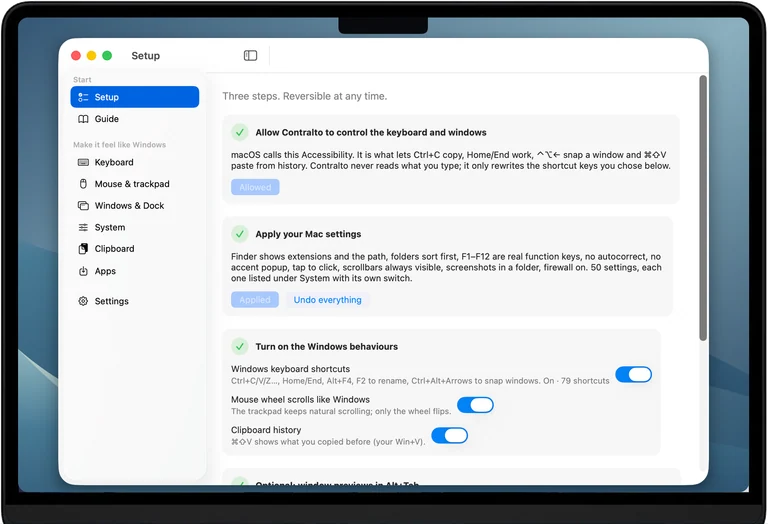
Apply 48 recommended settings at once.
04 / Settle right in
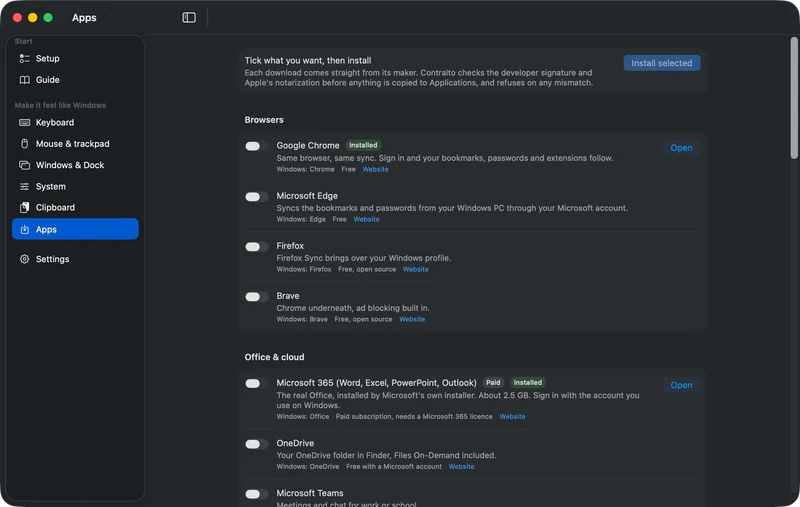
Choose from 26 apps. Install them together.
The guide, in Windows terms
Answers for your first days on a Mac.
05 / Your Mac stays yours
One payment. No subscription.
14-day trial. Every 1.x update included.
Personal
USD 19
3 Macs
For one person.
Family
USD 29
5 Macs
One household, non-commercial.
Team
USD 49
10 Macs, or 25 for USD 99
For organisations.
For teamsAvailable with the first release. 14-day refunds. VAT added where applicable. More seats: write to us.
Settings change through the same mechanism System Settings uses, and every change is written down first so it can be undone. Nothing is installed at the system level: no drivers, no kernel extensions.
It is the permission macOS uses for "this app may rewrite keyboard shortcuts and move windows". Every shortcut tool needs it. Contralto never records what you type; it rewrites only the shortcut keys you chose, and only while it runs.
No analytics, no account. Licence activation and periodic validation, update checks, and requested app downloads use the internet. Installing an app from the Apps list downloads it from its maker, the way a browser would.
Yes. Every behaviour has its own switch, terminals keep Ctrl as Ctrl, and you can exclude any app.
Yes. A PC keyboard plugged into a Mac already puts ⌘ under the Win key and ⌥ under Alt, and the shortcuts follow. Every keyboard layout works: the app translates each shortcut to the layout you type on.
Any Mac on macOS 14 Sonoma or later, Apple silicon or Intel.
Quit, and every shortcut goes back to macOS at once. Restore everything puts the settings back. Then drag the app to the Trash.
14 days with everything on and no card. After buying, 14 days to change your mind, for any reason: Polar, our merchant of record, handles the refund and revokes the licence key.
Personal: 3 Macs. For one person. Family: 5 Macs. One household, non-commercial. Team, for organisations: 10 Macs for USD 49 or 25 Macs for USD 99, with an invoice showing your company details and VAT id, the deployment profile for Jamf and Intune, and priority support. Larger counts by email.